Use Claude Code with OpenAI Models
Route Claude Code sessions to OpenAI GPT-5 and GPT-5 mini through Bifrost. Apply rule-based routing, automatic fallback, virtual keys, and per-developer observability without touching the agent.
- Cost tracking
- Rule-based routing
- Observability
- Budget controls
- Automatic fallback
[ Quick Start ]
Set Up the Gateway
Add two providers, create a virtual key, and launch Claude Code through Bifrost.
Prerequisites
npm install -g @anthropic-ai/claude-code. You can pair OpenAI with any secondary fallback provider later using routing rules.Start the Bifrost gateway
One command. Bifrost starts with zero configuration on port 8080.
Launch Bifrost with npx. The gateway comes up on port 8080 with a web UI for adding provider keys.
# Install and run Bifrost gateway
$ npx -y @maximhq/bifrost
✓ Bifrost v1.5.0 started
├─ HTTP server listening on http://localhost:8080
├─ Web UI available at http://localhost:8080
├─ Anthropic-compatible endpoint http://localhost:8080/anthropic
└─ Config store: SQLite ~/.config/bifrost/config.db
Add OpenAI and Anthropic as providers
Register both providers for routing and fallback.
In the Web UI go to Model Providers → Configurations. Add two providers: Anthropic as the primary target, and OpenAI as the fallback. Every provider you add shows up in Models → Model Catalog along with enabled models and live usage.
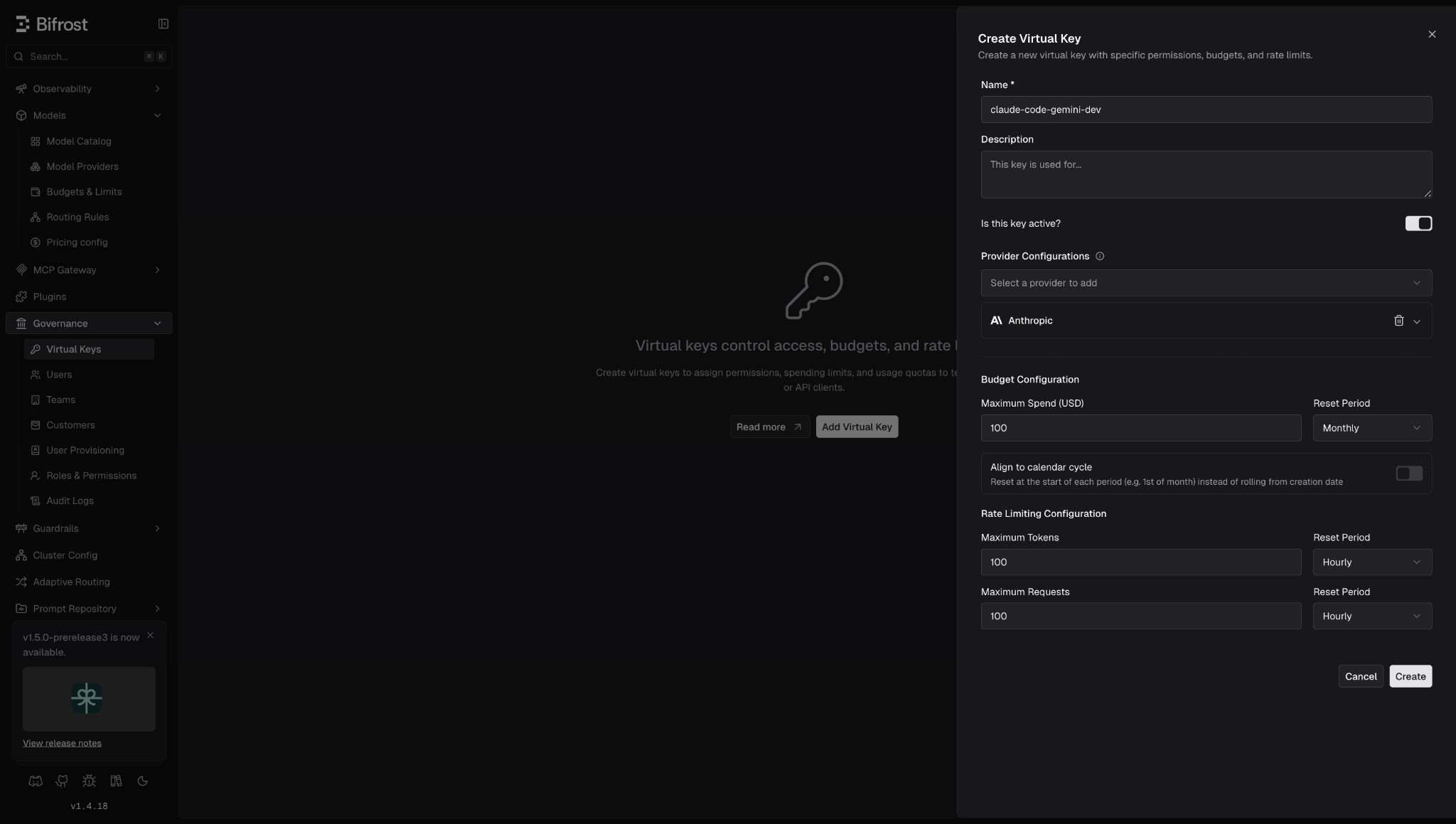
Create a virtual key with budget + rate limits
Virtual keys govern access with budgets and rate limits.
Virtual keys are how Bifrost governs access. Every Claude Code session will send x-bf-vk: <key> so you can scope allowed models, enforce a hard budget, and rate-limit requests per developer or team.
{
  "id": "sk-bf..",
  "name": "claude-code-openai-dev",
  "budget": { "max_limit": 100.00, "used": 0.00, "reset_duration": "1M" }
}Launch Claude Code through Bifrost
Point Claude Code at the Bifrost endpoint.
Point Claude Code at the Bifrost /anthropic endpoint. Bifrost accepts native Anthropic-format requests, translates them to OpenAI-compatible chat/completions requests, and returns responses in the format Claude Code expects, the agent never knows the backend is OpenAI.
$ npx -y @maximhq/bifrost-cli

# Claude Code automatically redirects to Bifrost at localhost:8080
$ claude
  ┌──────────────────────────────────────┐
  │             BIFROST CLI              │
  └──────────────────────────────────────┘

Step 1 ─ Base URL
  → http://localhost:8080

Step 2 ─ Virtual Key (press Enter to skip)

Step 3 ─ Choose a Harness
  ❯ Claude Code    v1.0.21  ✓ installed
    Codex CLI       v0.1.0   ✓ installed
    Codex CLI      not installed

Step 4 ─ Select a Model
  ❯ anthropic/claude-sonnet-4-5-20250929
    anthropic/claude-opus-4-5-20251101
    openai/gpt-5
    openai/gpt-5
/anthropic, not /v1/anthropic. This is Bifrost's Anthropic-compatible handler that does the protocol translation to OpenAI.[ Intelligent Routing ]
Route by Task, Budget, or Team
Routing rules evaluate CEL expressions on every request, route simple edits to Flash, reasoning-heavy tasks to Pro, and anything that touches prod to Claude. Rules run before governance provider selection and can override it.
Rule: send lightweight work to GPT-5 mini
Small edits, single-file refactors, and completion-style prompts don't need OpenAI 2.5 Pro. Route them to Flash based on a header Claude Code can set, or based on model name.
$ curl -X POST http://localhost:8080/api/governance/routing-rules \
    -H "Content-Type: application/json" \
    -d '{
      "name": "Flash for lightweight edits",
      "enabled": true,
      "cel_expression": "headers[\"x-task-type\"] == \"edit\" || headers[\"x-task-type\"] == \"completion\"",
      "targets": [
        { "provider": "openai", "model": "gpt-5-mini", "weight": 1 }
      ],
      "scope": "virtual_key",
      "scope_id": "sk-bf..",
      "priority": 0
    }'
Rule: escalate reasoning-heavy tasks to GPT-5
Planning, architecture, and multi-file reasoning benefit from GPT-5. Route anything with x-task-type: plan or with a large token budget to Pro.
$ curl -X POST http://localhost:8080/api/governance/routing-rules \
    -H "Content-Type: application/json" \
    -d '{
      "name": "Pro for planning and reasoning",
      "enabled": true,
      "cel_expression": "headers[\"x-task-type\"] == \"plan\" || headers[\"x-task-type\"] == \"review\"",
      "targets": [
        { "provider": "openai", "model": "gpt-5", "weight": 1 }
      ],
      "fallbacks": ["anthropic/claude-sonnet-4-5-20250929"],
      "scope": "virtual_key",
      "scope_id": "sk-bf..",
      "priority": 5
    }'
Rule: budget-aware downgrade
Capacity metrics are available to CEL expressions as percentages. When the virtual key passes 80% of its monthly budget, downgrade all traffic to GPT-5 mini automatically — no alert, no manual intervention.
$ curl -X POST http://localhost:8080/api/governance/routing-rules \
    -H "Content-Type: application/json" \
    -d '{
      "name": "Budget over 80% → Flash",
      "enabled": true,
      "cel_expression": "budget_used > 80",
      "targets": [
        { "provider": "openai", "model": "gpt-5-mini", "weight": 1 }
      ],
      "scope": "virtual_key",
      "scope_id": "sk-bf..",
      "priority": 1
    }'
model, headers[...], team_name, budget_used, tokens_used, and request.[ Automatic Fallback ]
Rate Limits and Outages, Handled
Retries handle transient failures within a provider. Fallbacks switch providers across providers once retries are exhausted. Each layer has its own configuration.
Retries: key rotation on 429s
On Anthropic rate-limit errors (HTTP 429), Bifrost automatically rotates to a different Anthropic API key from the pool before retrying. On network or 5xx errors it reuses the same key (transient server issue, not per-key capacity). Backoff is exponential with jitter: min(500ms × 2^attempt, 5000ms) × jitter(0.8–1.2).
$ curl -X PATCH http://localhost:8080/api/providers/anthropic \
    -H "Content-Type: application/json" \
    -d '{
      "network_config": {
        "max_retries": 3,
        "retry_backoff_initial": 500,
        "retry_backoff_max": 5000
      }
    }'
Fallbacks: Claude → OpenAI Pro → OpenAI Flash
When all retries against Anthropic fail, Bifrost moves to the next provider in the chain. Every fallback gets its own full retry budget, so a primary with max_retries: 3 and 2 OpenAI fallback with max_retries: 3 yields up to 12 total attempts before the request gives up.
# Any Claude Code request can pass a fallback chain
$ curl -X POST http://localhost:8080/anthropic/v1/messages \
    -H "x-bf-vk: sk-bf.. \
    -H "Content-Type: application/json" \
    -d '{
      "model": "anthropic/claude-sonnet-4-5-20250929",
      "messages": [{ "role": "user", "content": "Refactor this module" }],
      "fallbacks": [
        "openai/gpt-5",
        "openai/gpt-5-mini",
      ],
      "max_tokens": 1024
    }'
{
  "provider": "openai",
  "model": "openai/gpt-5",
  "fallback_index": 1,
  "latency": 1.4
}extra_fields.provider and fallback_index tell you which provider actually served the request. If every fallback fails, Bifrost returns the original error from the primary.[ Observe LLM Spend ]
See Every Request, Token, and Dollar
Open localhost:8080/workspace/logs after you start using Claude Code. Every request is logged with provider, model, virtual key, latency, token counts, cost in USD, and whether a fallback fired, all asynchronously, so observability adds zero latency.
Prometheus metrics out of the box
Bifrost exposes /metrics in Prometheus format. The most useful counters and histograms for Claude Code + OpenAI work:
- •bifrost_cost_total: Cumulative USD spend, labeled by provider, model, virtual_key_id, and custom labels.
- •bifrost_input_tokens_total: Total input tokens sent to providers. Same label set.
- •bifrost_output_tokens_total: Total output tokens received. Divide to get input/output ratio per model.
- •bifrost_upstream_latency_seconds: Histogram of upstream request latency. Include is_success label to separate error tail.
- •bifrost_stream_first_token_latency_seconds: Time-to-first-token histogram for streaming responses, the number developers feel.
Inject per-developer labels at request time
Add x-bf-prom-* headers to tag metrics with developer name, project, or environment. Pair with a single virtual key per developer for clean per-person cost attribution in Grafana.
# Add to your .zshrc so every Claude Code request is tagged
export ANTHROPIC_CUSTOM_HEADERS="x-bf-prom-developer:alex,x-bf-prom-team:platform"

# Now you can query spend in Grafana:
#   sum by (developer) (increase(bifrost_cost_total[7d]))
#   sum by (model)     (rate(bifrost_upstream_requests_total[5m]))
[ Governance Extras ]
Prompt Repository and Semantic Caching
Once the routing works, these two features compound the gains, version-controlled prompts for consistent evaluation, and semantic caching for free latency and cost reductions.
Prompt Repository for A/B testing across models
Bifrost's Prompt Repository lets you store and version prompts server-side, reference them by ID from Claude Code, and swap the underlying prompt without shipping a new CLI build. Combined with routing rules, the same prompt ID can hit OpenAI Pro for one cohort and Claude for another, clean A/B evals against a real workload.
Semantic caching for repeated queries
Enable semantic caching to serve similar prompts from cache instead of re-calling OpenAI. Developer workflows have massive duplication, the same "what does this function do" question asked against the same file returns the same answer. Cache hits show up in bifrost_cache_hits_total with cache_type = direct or semantic.
[ WHAT'S NEXT ]
Continue the Series
You've connected OpenAI. Explore the rest of the Claude Code series.
Claude Code Gateway
Set up Bifrost as a gateway with model routing, governance controls, and full observability.
Guide 02Use Claude Code with OpenAI models
Route Claude Code to GPT-5 and GPT-5 mini with virtual keys, budgets, and failover.
Guide 03Use Claude Code with Gemini models
Route Claude Code to Gemini 2.5 Pro and Flash with virtual keys, budgets, and failover.
[ RESOURCES ]
Explore Bifrost Resources
Add governance, guardrails, and MCP controls for production Claude Code deployments.
Ready to route Claude Code to any model?
Bifrost is open source and production-ready. Teams get started in minutes and scale without rethinking the architecture.
[ FAQ ]
Frequently Asked Questions
Yes. Bifrost exposes an Anthropic-compatible /anthropic endpoint that accepts Claude Code's native requests and translates them to OpenAI-compatible chat/completions requests. Claude Code is unaware the backend is OpenAI.
Any OpenAI model configured in your Bifrost provider, including GPT-5 and GPT-5 mini. You can pin models via virtual keys, route by request context, and switch models mid-session with /model.
Bifrost evaluates CEL expressions on every request using variables like headers, team_name, model, budget_used, and tokens_used. The first matching rule wins, and its target provider and model override the request.
Bifrost retries with exponential backoff and jitter, rotating to a different API key on 429 errors. If all retries are exhausted, it fails over to the next provider in your fallback chain. Each fallback gets its own full retry budget.
Yes. Virtual keys enforce hard budget ceilings and rate limits at the key, team, and customer level. When a key's budget is exhausted, subsequent requests are blocked in real time before they incur additional cost.
Bifrost exports Prometheus metrics including bifrost_cost_total, bifrost_input_tokens_total, and bifrost_output_tokens_total, labeled by provider, model, and virtual key. The built-in workspace logs show every request with model, latency, tokens, and cost.